How to Build a Job Application Answer Bank You Can Trust (With Checklist and Example)
Stop retyping the same details on every LinkedIn Easy Apply and careers-site form. Learn what to put in a job application answer bank, how to keep it truthful and current, and how to adapt saved answers.
Publisher disclosure: Apply with AI makes the extension discussed on this site. Product mentions and comparisons reflect that commercial interest.

If you apply through LinkedIn Easy Apply and employer careers sites, you have probably typed your phone number, job dates, work authorization status and the same short answers many times. Each retype is a chance to make a typo or give a slightly different answer than last time.
A job application answer bank fixes that. This guide explains what to include, how to keep every answer truthful and current, and how to adapt saved answers to each posting instead of pasting them blindly. It ends with a realistic example and a checklist.
What a job application answer bank is
A job application answer bank is one document holding the answers you give repeatedly on application forms: contact details, work history summaries, eligibility statements, salary and availability answers, and your best short responses to common questions. You fill it in once, check it carefully, and copy from it instead of rewriting answers from memory.
It does two jobs. It saves time on long employer forms, and it keeps you consistent. When the same recruiter sees your LinkedIn Easy Apply answers and later your careers-site application, the dates, titles and eligibility answers should match. A bank makes accidental contradictions less likely.
Tip Keep the bank in one place, such as a single document or note. Several partial copies drift apart and recreate the inconsistency problem you were trying to solve.
What to include
Organize the bank by the kinds of questions forms actually ask. Start with facts that rarely change, then add answers that need judgment.
- Contact block: full name as it appears on your resume, email, phone with country code, city and state or region, LinkedIn URL, portfolio or GitHub link.
- Work history: for each role, exact title, employer, city, start and end month and year, and a two to three sentence summary. Forms that ignore your uploaded resume often ask for this field by field.
- Education and certifications: institution, degree or credential, field, completion date, and license or credential numbers only where an employer has a real need for them.
- Eligibility statements: work authorization in each country you apply in, whether you need sponsorship now or in the future, willingness to relocate, travel tolerance, and onsite, hybrid or remote preference.
- Logistics: earliest start date, notice period, salary expectation as a range with a note on how you arrived at it, and preferred interview availability.
- Short answers: why you are looking, a summary of your strongest relevant achievement, how you handle a common challenge in your field, and a one paragraph professional summary.
- Voluntary disclosures: your chosen answer to optional demographic or self-identification questions, including whether you prefer to decline. Decide once so you are not deciding under time pressure.
- References: names, relationships, and contact details only for people who agreed to be listed.
Tip Do not store highly sensitive identifiers, such as government ID numbers or bank details, in a general answer bank. Enter them only when a verified employer asks during a legitimate hiring step.
How to keep each answer truthful
A saved answer is reused dozens of times, so a small exaggeration gets multiplied. Write every entry as something you could defend in an interview without hesitation.
Eligibility answers deserve the most care. Yes or no questions about authorization, sponsorship, licenses or background checks are often used as hard filters, and a wrong answer can end an application or cause problems later. Write the exact answer, plus a one-line note on what it is based on.
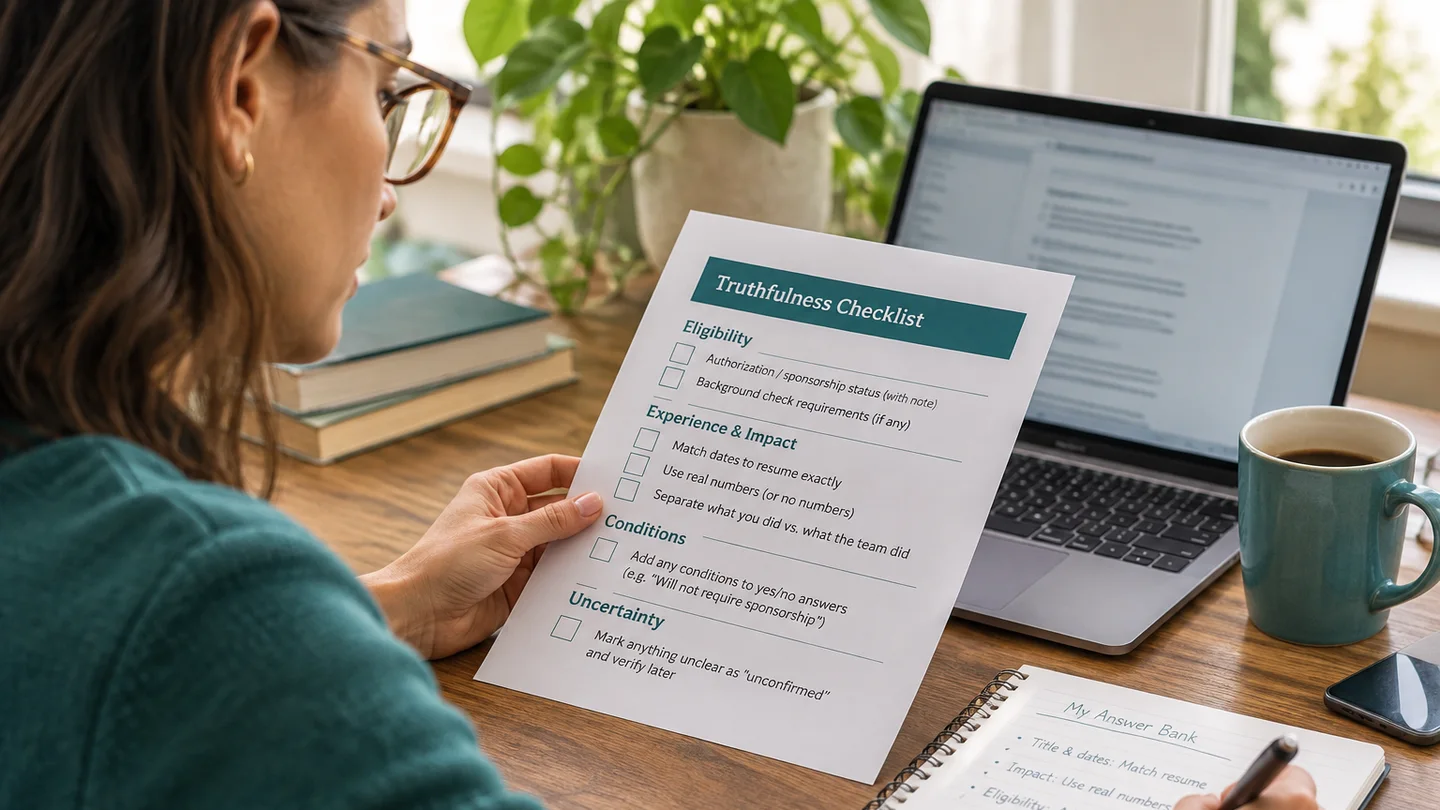
- Match your resume exactly on titles and dates. If your resume says March 2021 to August 2024, the bank should say the same.
- Use real numbers or no numbers. Write 'reduced monthly close from 10 days to 6' only if you can explain how you measured it.
- Separate what you did from what the team did. 'Led the migration' and 'was part of the migration team' are different claims.
- Record conditions next to yes or no answers, for example 'Authorized to work in the US; will not require sponsorship' or 'Willing to relocate within the Midwest only'.
- Mark anything you are unsure about as unconfirmed until you check it, rather than guessing once and reusing the guess.
Adapt saved answers instead of pasting them blindly
The bank is a starting point. Contact details and dates can be copied as is. Short answers, summaries and salary responses usually need adjusting for each role, or they read as generic and sometimes answer a different question than the one asked.
- Read the question in full before copying anything. 'Why are you interested in this role?' is not the same as 'Why are you leaving your current job?'
- Check the format. Note character limits, whether the field wants a number or text, and whether a dropdown uses different wording than your saved answer.
- Pick the closest saved answer and cut what does not apply to this posting.
- Add one detail specific to the employer or role, such as a tool, product or responsibility named in the job description.
- Re-check eligibility answers against the location in the posting. Remote, hybrid and onsite roles in different countries can change the correct answer.
- Read the finished field once more before moving on. If the form shows a review page, use it.
- If you wrote a better version, save it back into the bank so the next application starts from the improved answer.
Tip If a saved answer would need more than a sentence or two of changes to fit, write a new one. Forcing an old answer onto a different question is where most awkward applications come from.
Keep the bank current
An answer bank goes stale quietly. Your notice period changes, a new certification arrives, or you rethink your salary range after a few interviews. Out-of-date answers are worse than none because they look trustworthy.
- Add a 'last reviewed' date at the top of the document.
- Review it whenever something changes: new job, new location, visa status update, new credential or changed availability.
- Do a quick review every few weeks during an active search, focusing on salary, start date and eligibility.
- Update the bank whenever you update your resume, so titles, dates and achievements stay aligned. If you keep several resume versions, note which version each summary pairs with.
- Delete answers you no longer stand behind instead of leaving them in for later.

A realistic example
Here is how one section of a bank might look for a mid-career operations analyst applying to roles in the US. Only part of the full document is shown.
Example
Last reviewed: November 2026. Eligibility: Authorized to work in the US. Will not require sponsorship now or in the future. Open to relocation within Texas; prefer hybrid; up to 15% travel. Logistics: Two weeks notice. Earliest start: two weeks after offer acceptance. Salary range: USD 78,000 to 88,000 base, based on similar postings in Austin and my current base. Current role: Operations Analyst, Northfield Logistics, Austin TX, June 2022 to present. Summary: Own weekly carrier performance reporting for three regional warehouses. Built a shipment-exception dashboard in Power BI used by the regional operations team. Short answer, biggest achievement (base version): I rebuilt our carrier scorecard so late shipments were flagged daily instead of weekly, which let the team escalate issues before customers called. Adapted for a supply chain analyst posting that mentions SQL: I rebuilt our carrier scorecard using SQL queries against our shipment database, so late shipments were flagged daily instead of weekly and the team could escalate before customers called.
Tip Notice the adapted answer adds only what is true and relevant (SQL use) and keeps the original claim unchanged.
Using saved answers with an application tool
Apply with AI, which publishes this guide, is a Chrome extension that can use saved answers on LinkedIn. Its LinkedIn job agent works on Easy Apply jobs and, if you choose, on jobs that send you to an employer's own careers site. For those external-site applications, it fills the form from your saved answers and its Facts Bank, uploads the resume you keep in its settings, and writes a short cover letter when a box asks for one.
The same truthfulness rules apply. A tool filling forms from your answers will repeat whatever is in them, so an accurate, current bank matters even more. On LinkedIn, auto-submit is on by default. You can turn it off per run or in settings, and the agent then stops on the review step, including the final Submit on external sites, so you can check each answer before pressing Submit yourself. This is a sensible setting while you are still refining your saved answers.
Upwork works differently. There, the extension drafts proposals and screening answers into the form for your review and never submits. For plan details, see the pricing page; AI provider access is separate.
Tip Run your first few applications with auto-submit off. Compare what was filled against your bank, fix any answer that came out wrong at the source, then decide whether you want to keep reviewing every application.
Answer bank checklist
- Contact details match your resume exactly, with phone country code.
- Every role has the exact title, employer, location and start and end month and year.
- Work authorization, sponsorship, relocation and travel answers are written with their conditions.
- Salary range, notice period and start date are current.
- Each short answer is true, specific and something you can explain in an interview.
- Voluntary disclosure choices are decided in advance.
- References have agreed to be listed.
- A 'last reviewed' date sits at the top, and no highly sensitive identifiers are stored.
Related guides
Frequently asked questions
Where should I keep my job application answer bank?
Anywhere you can search and copy from quickly, such as a single document or note app. What matters more than the tool is having only one current version and a last reviewed date at the top.
Should I give the same salary answer on every application?
Keep a base range in your bank, but check it against each posting's location and level. If a posting lists a range, consider whether your saved answer still makes sense for that role before submitting.
How long should saved short answers be?
Write a base version of a few sentences, then trim it to fit each field. Many forms have character limits, and a shorter, specific answer usually reads better than a long generic one.
Is it fine to reuse answers word for word?
For contact details, dates and eligibility, yes, as long as they are accurate for the role's location. For short-answer and motivation questions, adapt them so they answer the exact question and reference the specific role.
Does Apply with AI submit LinkedIn applications automatically?
On LinkedIn, auto-submit is on by default. You can turn it off per run or in settings, and the agent then stops at the review step, including before the final Submit on employer sites, so you submit yourself. On Upwork, it fills proposal forms for review and never submits.